


Discover the latest industry news and audio post production.

This blog outlines seven key ways to involve sound design in pre-production, from script analysis to shaping the edit, ensuring a smoother workflow and a more immersive final product.

July 26, 2018
Earlier this week we discussed the importance of beginning Sound Design in the Pre Production stages of a film or video game. At 344 Audio we believe that every project can be enhanced with the early involvement of the Audio Post Production team. There was a good response from Directors and Sound Designers alike, so we decided to put together a list of 7 ways to get involved early on.
While reading through the script, get your creative juices flowing by noting what kind of sound effects might help to tell the story more effectively. Look for passages that refer to sound, or opportunities to world build with atmospheric effects.
Some productions will call for sound effects to help shape the actors performance on set, more notably on larger budgets. When making a film about a huge monster, it is much easier for an actor to react on set when it's sound is triggered in line with their performance.
Sound Designers often have quite a lot of connections in Location Sound, and will likely be more than happy to advise on your choices if you bring them on in Pre Production. They will also know Foley Artists, Dialogue Editors and Re-recording Mixers, all of which you will likely need.
Getting your Audio Post Production team in early means that we can help with advising on your location choices, perhaps the rooms chosen are too reverberent, or too noisy? From a budget perspective this knowledge is invaluable for saving on ADR time and costs. We can also take a listen to your rushes to advise on possible ADR before your actors disappear into the wilderness!
The workflow for Post Sound still remains a mystery to many Directors and Producers. When we have the time to guide you through the delivery of media to us, it makes both our lives so much easier and leaves more time for creativity. The way your Editor lays out the dialogue and music tracks is much easier corrected from the beginning, rather than being passed on as an issue further down the line.
Let's face it, Directors like to tinker. Why not, it's their film? Getting involved early allows you to start tackling challenging sound cues, getting their feedback before the post production schedule starts and experimenting with lots of source material like field recordings and manipulated effects.
Good Directors know that sound and picture work as one seamless tool together, so don't be afraid to let your Sound Design inform the edit. If the Editor shaving off a frame helps sync the rhythm of the scene better, pitch this to the team and see what they think.
Let us know in the comments section if there are any other ways that you get involved in Pre Production Sound Design!

Explore if a reliable near-field 5.1 monitoring system can be achieved under £1000, with a detailed comparison of JBL, Genelec, and HEDD speakers, revealing a solid budget-friendly option for sound designers and mixers.
February 10, 2018
The comparison was conducted in a relatively small room, which was acoustically treated. One of our 5.1 film mixes was played at 80 dB SPL (A weighted scale) via Cubase through a Presonus Quantum audio interface.
After testing out numerous monitors and reading countless reviews, we whittled it down to three options at different price brackets. The Genelec 8030B (£459 per speaker), the HEDD Type 05 (£366 per speaker) and the JBL LSR 305 (£103 per speaker). Our LFE channel was sent to two different subwoofers for comparison, these included the JBL LSR310S (£332) and the ADAM Sub8 (£519).
We watched and listened to 5 minutes of our 5.1 mix, and then played some Drum & Bass music in stereo to test out the overall dynamic range, transient response and frequency reproduction of each speaker.

As we listened to each system, we made notes on what immediately stood out on our tried and tested 5.1 mix file, as well as the music track, here are our notes:
Monitors:
JBL LSR 305
Genelec 8030
HEDD Type 05

Subwoofers:
JBL LSR310S
ADAM Sub8

So, is it possible to get a usable nearfield 5.1 monitoring system for under £1000? The answer is yes!
The JBL LSR3 series offers an extremely well balanced system for the price, with imaging that rivals monitors costing 5 times as much. You will have slightly less transient response, but this 10-20% difference will not be alleviated until you spend at least 3 times as much per speaker. These monitors feel like they will translate well to other systems, as they are not hyped at any particular frequency.
This is great news for cost conscious Sound Designers or beginners wanting to get exceptional value 5.1 monitoring without investing a huge lump sum. Bare in mind you will also need an interface with 6 outputs to hook up your speakers/sub for mixing. Some options include the Focusrite Scarlett 18i20, Clarett 8preX and Presonus Quantum.

Master action sound design with layering, anchor effects, dump tracks, sample variety, and mono hits for a dynamic and immersive mix.
December 2, 2017
The layering of sound effects is a common technique used when tracklaying most films. If you combine sounds with different frequency content, you tend to get a fuller mix. But what many people don't realise is that when laying action effects, a repeatable formula helps bring your projects to life.
On The Divison, we used the same layering formula repeatedly to achieve consistency and reliable results.
For example, each face punch consisted of a hit, bone crack, cloth whoosh, blood splatter, kick drum and designed impact:

Anchor effects help build a basis for hits in your tracklay. Placing them as a temp track on each effects cue lays a foundation that you can later build upon.
When designing gunshots and hits for The Division, we continuously used the same base layer, and then added unique effects to differentiate characters. Not only did this achieve coherency in our tracklay, but the mixing process became more predictable.
The use of Dump tracks allows you to temporarily store enough variations of sound effects to cover entire scenes.
For example, once all of your variations of punch effects are laid, you can copy them down to your Spot FX tracks as needed in the session, which speeds up your editing speed dramatically.
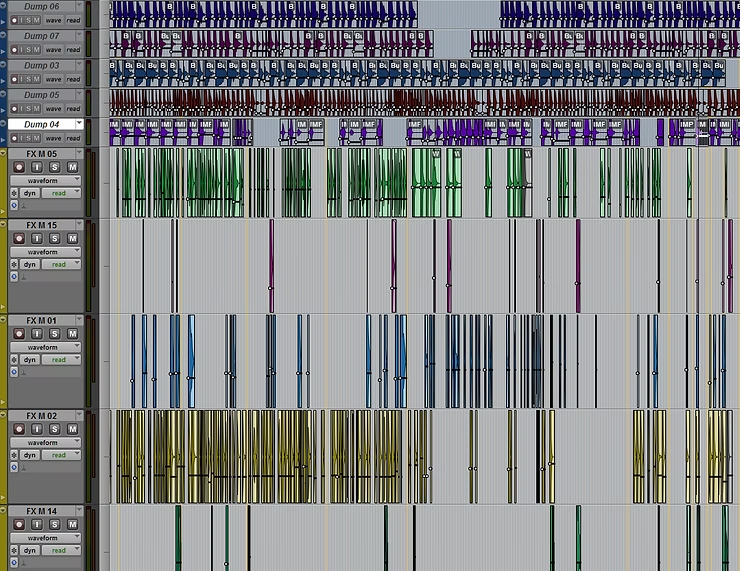
Using a variety of samples is crucial in achieving a dynamic mix which compliments the picture. It is not uncommon for us to use 30+ different variations of punch, kick, whoosh and bone cracks within a scene. Failure to do this will lower the perceived production value of the film, and make it feel like an old Kung Fu movie.
Most of your layers for a hit should be in mono, to give them direction in the mix. Try shortening and fading samples to provide more realism on fast paced scenes. Reverb and delay can provide spatial awareness and further worldizing where necessary.

This blog explores how sound, from dialogue and sound effects to mixing and Foley, plays a vital role in storytelling, world-building, and immersing audiences in a film.
November 7, 2017
Ever since 1920's when the ‘talkies’ (films with sound) started to emerge, filmmakers have been using dialogue heavily to convey emotion, complex narratives and continuity; and rightly so. There is no sound more stimulating to the human brain than speech, which is why most popular music includes vocals, as do most popular films. It is important to remember that this is why you must hire a good Location Sound Recordist and Dialogue Editor, to ensure that the audience hears one of the most effective storytelling tools at our disposal.
In this scene from The Wolf of Wall Street, the ambient sounds of the restaurant are pushed back to let the well recorded dialogue engross viewers without any musical support:
All of those doors closing, vehicles passing, crows cawing and punches to the face help present your film world to the audience. Sound effects aren’t there to simply fill spaces and on screen cues. They are there to world build and cover off screen elements too. How will your audience know the film’s location if it isn’t presented visually? The ambient sounds within your scenes will also give a sense of width and immersion which tells the audience where the scene is set and how to feel. This often allows visuals to be simpler and less direct.
In this famous scene from Saving Private Ryan, the audience is alerted to the location, and immersed mainly through Sound Effects:
In recent years, we have seen the most abstract and complex creatures created with CGI and Visual Effects. One thing that makes these creatures come to life, and feel relatable, is the way that they are Sound Designed. The use of animal noises, musical instruments and natural elements, taps into the psyche of the viewer, making them believe the powerful monster that they are seeing on screen could be real.
The sound of predatory animals like alligators, tigers and bears make up this monster and trigger our primal fear instincts in Avatar:
Foley is an interesting art form, in that many viewers don’t notice it until it isn’t there anymore. The work of a Foley Artist is crucial in achieving a full bodied and fluid soundtrack. Each character can have a personality with Foley, from the way they walk to the way they interact with items around them.
In this scene from Snatch, the Foley gives us an impression of a creaky, beaten old caravan camp, which sets our expectations low for the character of Mickey, only to surprise us with his strength later.
Mixing is an invaluable tool for Directors to create dynamics and flow between scenes. The use of spatial awareness with reverb and echoes provides a sense of the space that the film inhabits. The use of frequencies and pitch give an impression of the size of characters and props. The use of spatial panning extends the story beyond the screen and allows us to be immersed and surrounded with audio.
This scene from The Jungle Book puts Mowgli in the space of the creepy, deep jungle with heavy reverb on his voice. Kaa is brought closer to us by her echoey dialogue sound, which is accented with reverb only on specific words - adding to her guile and quiet ferocity.
What do you think - is Sound really 50% of a film? Let us know in the comments section below.

This blog outlines key audio post-production roles and tools, from sound designers to mixing equipment, essential for crafting a film’s sound.

October 6, 2017
Welcome to part 3 of Audio Post Production Demystified. You can find part 1 here and part 2 here. The media industry is fast paced and ever changing. Here at 344 Audio we are dedicated to keeping up with all of the latest trends and guiding filmmakers through our process. Join us in exploring some of the most highly anticipated emerging audio technologies used today. As an added bonus, we have provided a Language Glossary for our readers.
So, you are probably wondering, what's the next big step in film sound? We have 4K cinema projection, IMAX, 8K cameras, what has changed in audio?
One of the most exciting emerging technologies in film sound, comes from industry innovators Dolby. Dolby Atmos is a multichannel format that expands on the capabilities of 5.1 and 7.1 surround sound by offering additional speakers (up to 64 speakers in total) with some speakers being placed above the viewer. It also offers object based panning, which means that complex movements are no longer limited by the amount of speaker channels in a system.
The panning data of a sound is more specific and has a higher resolution when more speakers are employed in the playback system. This can create really dynamic and clear mixes with plenty of options to separate elements, as well as provide an immersive experience for viewers.
Other immersive audio formats are being used in 360 video, which employ object based panning, or ambisonics.

Adobe were met with considerable criticism and concern when they revealed Voco, a Speech Synthesis Technology that is working towards being indistinguishable from real human voices.
It works by recording at least 20 minutes of a Voice Actors speech, and can then generate phonemes from the resulting material, even some that were not present in the recordings.
The implications of this ethically are concerning to some, but it could mean that one day ADR Recording will become a thing of the past. Voice Actors would simply record their 20 minute's for various accents and dialects, and then license this to Producers for use in a film.

Audio software plugin developers Slate Digital, introduced their latest ground breaking technology recently - Slate Digital VMS.
This hardware/software combination uses an extremely transparent microphone and a sonically neutral preamplifier to capture signals and then process them in to order to replicate some of the industry's most revered modern and classic microphones.
The reason that this technology is so exciting, is that it allows the user to change the virtual microphone after recording, offering much more flexibility to alter the tone of a voice performance in the mix.

Krotos Audio are Edinburgh based software developers known for their forward thinking approach to Sound Design tools.
Boldly going where no one else will go, they have created two profucts which have changed the way that we create and implement Sound Design.
Their first product, Dehumaniser, has taken the industry by storm. It gives Sound Designers a much more intuitive and direct approach to designing creature and character vocalisations. It was used in the recent live action adaptation of Jungle Book and many other films and games. Dehumaniser offers a multi step process which shapes the performance of a Voice Actor in the studio. This allows their live performance to sound like an animal or monster.

Their second product, Reformer, allows users to speak or perform foley into a microphone, and trigger specific sounds. For example, we can speak into a microphone and generate random alarm sounds, tap on the floor to create the sounds of a walking Tiger or even bend some plastic to create flesh ripping effects.

Izotope are a household name in the world of sound for film. Their industry leading RX software controls and reduces unwanted artefacts and noisy audio.
Their latest venture however, is also a game changer. Neutron is a smart mixing tool that can help balance audio tracks intelligently, and save some time on fast turnaround projects. It uses multiple tools which analyse incoming audio and apply changes throughout the Final Mix.

Another product that has both surprised and excited the film sound community in recent years is Sound Particles.
This software allows for the use of 'particles', a CGI like system which can generate thousands of sounds and place them in a 3D space, capturing them through a user defined set of virtual microphones to increase the realism and extend the usefulness.
Common uses for this include battlefield scenes, where Sound Designers spend days crafting sound assets to immerse and excite the viewer. Sound Particles can take gunshot, vehicle and vocal recordings of your choice, randomise them and spread them across the sound stage, in much less time than it takes to execute this manually.

There are now 'Virtual Foley' softwares available, which allow Foley to be performed using a MIDI keyboard to trigger footstep sounds against the picture. The performer plays keys on the keyboard while the software cycles though tens of versions of footsteps for each shoe and surface type needed.
Although this software can be useful, it does not quite replicate the flow and artistry of a recorded Foley performance.

Equaliser (EQ) - An audio effect which attenuates or increases user defined frequencies.
High Pass/Low Cut Filter - An audio effect that attenuates all frequencies below a user defined frequency cutoff point.
Low Pass / High Cut Filter - An audio effect that attenuates all frequencies above a user defined frequency cutoff point.
Compressor - An audio effect that reduces the dynamic range of a signal.
Expander - An audio effect that increases the dynamic range of a signal.
Gate - An audio effect that mutes the signal once it's level falls below a certain threshold.
Reverb - An audio effect that simulates the reflective sounds of a room or space.
Delay - An audio effect that duplicates a signal and then delays it to create echo effects.
Chorus - An audio effect that uses multiple delays and offsets them by varying degrees to simulate a vocal chorus.
Phasing - An audio effect that uses a duplicate version of a signal with a variable phase shift to create movement.
Flanger - An audio effect that duplicates a signal and delays it by a small increment to create a metallic texture.
Time Compression/Expansion - A process in which audio is stretched or shortened without changing in pitch.
Pitch Shift - An process which changes the pitch of a signal.
Panning - An audio effect where the signal moves around the stereo field.
Noise Reduction - An audio effect that can aid in reducing noise, clicks, pops, breaths and other unwanted sounds within a signal.
Dry - An audio signal before processing.
Wet - An audio signal after processing.
Oscillator - A device that generates an audio waveform, usually used for sound design in synthesizers or for testing audio devices.
Output - The location where a signal leaves the device.
Input - The location where a signal enters the device.
Amplify - Increase the level of a signal.
Attenuate - Decrease the level of a signal.
Psychoacoustics - The science behind the perception of sound.
Doppler Effect - A psychoacoustical phenomena in which a sound appears to change in pitch as it moves past the listener at high speeds.
Haas Effect - A psychoacoustical phenomena in which two duplicate signals are only perceived as independent from one another when delayed by >30 ms or amplified by >10dB.
Masking - A psychoacoustical phenomena in which louder sounds affect the clarity of quieter sounds within the same frequency band.
Threshold Of Pain - The level at which sound can become painful to humans, generally accepted to be 120dB SPL.
Threshold Of Hearing - The level at which sound can become audible to humans, generally accepted to be 0dB SPL.
Decibel (dB) - A logarithmic scale for the relative measurement of a sound's intensity level.
Volume - A non technical term that usually refers to the SPL of a signal.
Loudness - A term used to describe the perceived intensity of a signal, which is usually subjective. Loudness can be measured in Loudness Units (LUFS) or Sound Pressure Level (SPL).
Gain - A parameter which alters the input level of an audio device.
Headroom - The difference between the peak and average level (RMS) of an audio waveform.
Normalise - To adjust the level of a signal so that it's highest peak is at a user defined level.
Frequency Range - The range of frequencies in which an electronic device is useful.
Dynamic Range - The difference between the highest and lowest signal level in an audio waveform.
Signal To Noise Ratio - The ratio in level between desirable audio (signal) and undesirable audio (noise) within a recording.
Noise Floor - The level of noise below the desired signal level. This can be measured in Decibels (dB).
Bit Depth - The resolution of an audio signal, measured by the amount of bits per sample.
Sample Rate (kHz) - The number of samples an audio signal carries per second.
Mono Recording - An audio file which has been recorded with a single microphone.
Stereo Recording - An audio file which has been recorded with two or more microphones.
In Sync - An objective measurement made by the Sound Team which shows that two audio waveforms align correctly.
Out Of Sync - An objective measurement made by the Sound Team which shows that two audio waveforms do not align correctly.
Analogue Signal - A smooth continuous waveform with infinite set of values.
Digital Signal - A waveform with steps and a finite set of values.
Phase Cancellation - An audio discrepancy caused by a duplicated signal being phase inverted (waveform being turned upside down) which can attenuate the signal level completely.
Feedback - An audio discrepancy caused by a signal being recorded and reproduced in close proximity, which can cause loud distorted sounds.
Clipping - A distortion caused by recording or exporting audio above the systems capable level. The upper limits of the waveform will be squared off.
Resonant Peak - An audio discrepancy caused by a narrow range of frequencies that are much more prominent in a signal.
White Noise - An audio discrepancy caused by using inferior recording equipment.
Hum/Rumble - An audio discrepancy caused by the presence of electrical equipment in close proximity to the microphone when recording.
Click - An audio discrepancy that occurs when an unwanted transient is present in an audio waveform.
Pop - An audio dependency that occurs when plosives (P, B) are used in speech and the microphone is not appropriately protected.
Overdubbing - The process of layering recordings together through multiple performances.
WAVE File (.wav) - an uncompressed audio file format that can carry extensive metadata. The BWF variation can carry additional data such as time stamps.
Audio Interchangeable Format File (.aiff) - An uncompressed audio file format created by Apple.
MP3 File (.mp3) - A compressed audio file format widely used in music.
Advanced Audio Coding File (.aac) - A compressed audio file format commonly attached to compressed video files.
Phantom Power - A system used to supply condenser microphones with operating power, negating the need for external power supplies.
Tweeter - The part of a speaker that reproduces high frequencies.
Woofer - The part of a speaker that reproduces low frequencies.
Automation - A process in which a DAW can adjust user defined parameters whilst the mix plays.
Beats Per Minute (BPM) - A steady clock which represents the perceived speed of a music track.
Condenser Microphone - A microphone powered by 48V Phantom Power.
Dynamic Microphone - A microphone powered by the movement of air.

Congratulations, you have now completed all three parts of our comprehensive guide to Audio Post Production. If you are looking for a refresher on Job Roles or Workflow in Audio Post, check out part 1 and part 2 of this series. Let us know what you want to read about next!


