


Discover the latest industry news and audio post production.
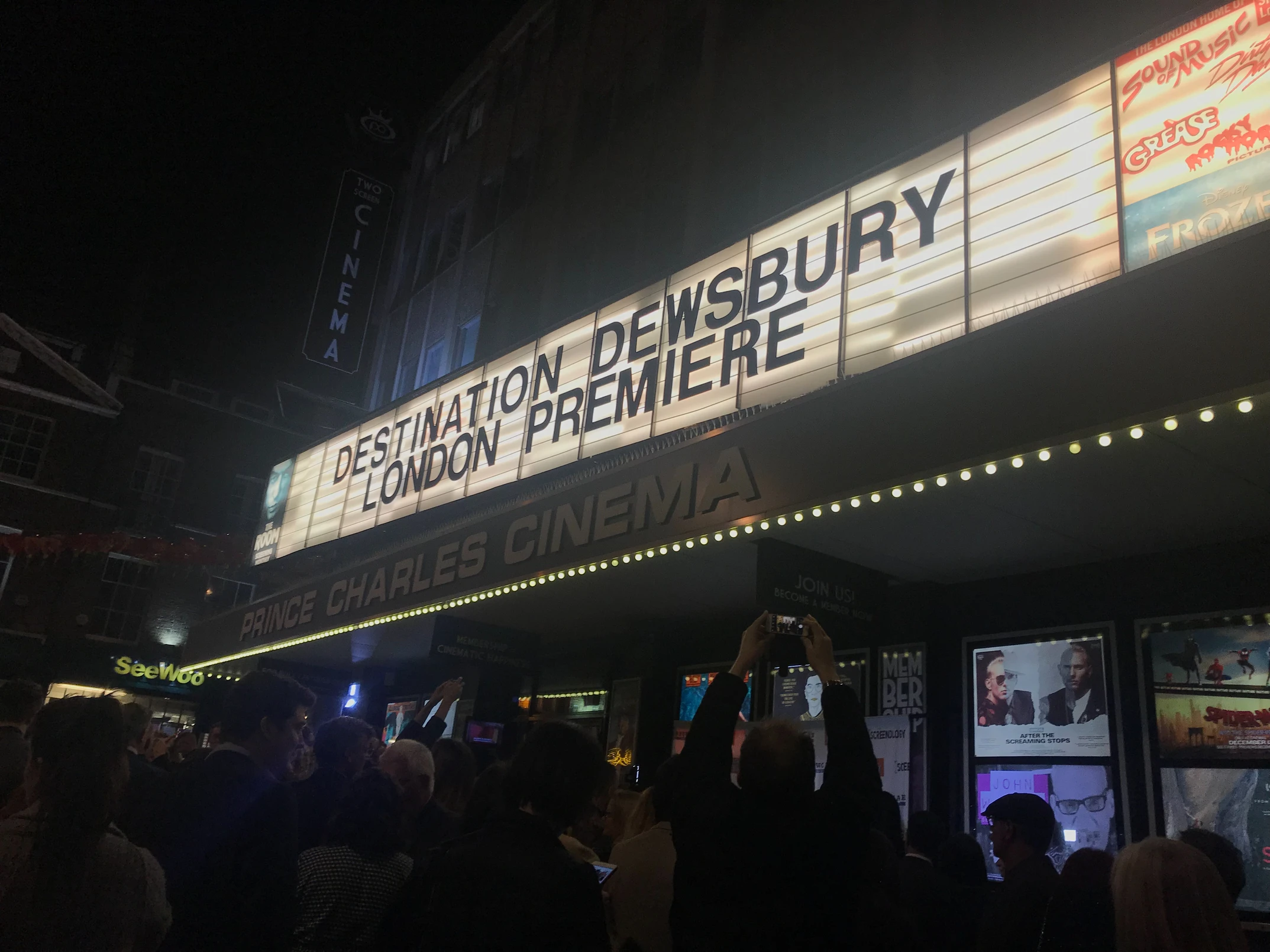
Feature Film Destination Dewsbury has now premiered in Beverly Hills, Leeds and Leicester Square London ahead of it’s Cinema release.

November 23, 2021
Feature Film Destination Dewsbury has now premiered in Beverly Hills, Leeds and Leicester Square London ahead of it’s Cinema release in March. 344 Audio supervised the entire post production sound process, from dialogue editing to sound design/mixing.

We attended both British screenings and the audience reaction was excellent. The whole sound department, cast and crew have worked extremely hard to bring this film to screen, and we can’t wait for wider audiences to see it in March at Showcase Cinemas.

This is just the beginning of the slate of Feature Films due to have their sound post production compelted at our studios this year.

If you often design complex sound worlds within films, or enjoy visualising your effects and executing advanced audio cues Sound Particles 2.0 is for you.
November 23, 2021
Company: Sound Particles
Product: Sound Particles 2.0
Price for Individuals: $16.90/month
Price for Companies: $49.90/month
Price for Individual One Time Payment: $399
Price for Team One Time Payment: $2,490
Our Rating: 4.8/5
Industry revered sound design software Sound Particles brings further advancements with it's 2.0 version, which is dubbed as the Ultimate 3D Audio Software for audio professionals and we would be inclined to agree. It allows you use audio samples as 'particles' which can be triggered according to a predefined set of start times, movement parameters, and audio modifiers then rendered through a virtual microphone system.
Sound Particles 2.0 is now available for both Mac and PC, much to Windows users delight. It comes as a downloadable program installer file and is very easy to set up. Once installed and opened you are met with a templates window, which allows you to select from some of the templates such as 'Battlefield' and 'Doppler' in order to manipulate audio in a variety of ways.
Once a template is selected, or an empty template is selected, you will then be met with the beautifully designed interface, which has an almost 'CGI-like' view of your particle elements.
At the top of the interface, you will see the perspective view of your particles (denoted with small dots) as well as the virtual microphones (denoted with arrows) This is such a user friendly way of demonstrating what could be a very cryptic audio system otherwise.

Like Pro Tools, you have the ability to create multiple types of tracks in the section at the bottom with the 'plus' button. You can create Particle Groups, which will trigger whichever audio files you have imported into the audio files section. You can create Particle Emitter, which will emit samples at a predefined particle rate per second, which is where the magic in Sound Particles really is. You can import a couple of audio samples of dogs barking, and allow the Particle Emitter to generate a huge kennel of angry canines. It is also possible to add a single point source track if required. You can even create a Mic System track and choose between a variety of formats including stereo, 5.1, Atmos and Ambisonics 1st order through to 6th order, these are used to record and then later render your audio in a virtual space. Finally, a video reference can be added to watch your rendered files in context.

There are some very forward thinking features like the ability to import CGI elements and link particles to those.

Some of the obvious use cases for Sound Particles are when you need to generate lots of variations of a single or a few sounds in a large space. Traditionally, Sound Effects Editors will tracklay huge battle scenes, or medieval villages by placing background effects and then more specific spot effects which have be panned, worldized, eq'ed and reverbed individually. Sound Particles allows you to import a couple of these sounds, perhaps some mono gunshots, explosions and screams, and then use particle emitters and a mic system track in 5.1 to generate an entire soundscape in minutes. You can personalise the audio modifiers involved in the random distribution of particles. For example, I could add a pitch variation of 5%, a random gain of 6dB, and then hit render and Sound Particles will do the work for you.
Another very common use is generating Doppler sounds from mundane or static effects. The Doppler effects in Sound Particles have been called the best sounding in the industry. And although they are in a separate software to Pro Tools, the creative process is easy and intuitive. Once you have hit render to generate your elements, you can play them back or export them to audio for use in your DAW.
You can get as much, or as little involved as you want in the parameters behind the scenes. This is the magic of Sound Particles. You can use the templates and import different audio elements as particles and generate hundreds of variations, or you can add 10 different audio modifiers to generate full 7.1.2 Atmos beds.
So how does it sound? F***ing amazing. This is the most natural 3D Audio Engine that we have ever experienced. Because of the way it uses the unique particle engine, the results are very convincing, and we will be using Sound Particles 2.0 on lots of upcoming projects. Particularly from a creative world building perspective, this the future of audio design and creative media projects.
Sound Particles created a bit of controversy in the industry with the initial 2.0 release of the software, which was priced much higher. The company responded by reducing the price for a limited time, which is very noble of them, as it shows their commitment to listening to their user base.
The pricing is rather high for a perpetual license, but you do have the option to subscribe for a nominal fee. This software is definitely not a gimmick like many 'experimental audio tools', but instead offers a genuine solution to a common problem with Sound Designer's increasingly harsh deadlines and quality expectations.
The other area that really needs some further development are the templates available as standard. With such a complex and multi faceted software, you would expect the developers to create much more of these.
If you often design complex sound worlds within films, or enjoy visualising your effects and executing advanced audio cues Sound Particles 2.0 is for you. The Doppler and atmospheric sounds on offer here are second to none, and very fast to define and render.
Check Out Sound Particles Here!

The ERA Bundle 3 is an Audio Repair Suite makes it possible for you to focus less on the every day audio problems you may encounter and more on your creative contribution to your project.
November 23, 2021
Company: Accusonos
Product: Era Bundle 3
Price: $149
Our Rating: 4.7/5
The ERA Bundle 3 is an Audio Repair Suite designed for beginners and seasoned professionals alike. This technology makes it possible for you to focus less on the every day audio problems you may encounter and more on your creative contribution to your project.
A single knob interface makes each of the plugins here user friendly for both sound professionals and video editors with better looking interfaces than Izotope RX.
The Noise Remover plugin has been voted the best sounding by Pro Tools Expert readers against RX and other industry giants, and when used as a live plugin, we certainly agree that is sounds smoother and is more effective.
The Voice Leveler has a transparent sound and is very intuitive for those fast level adjustments on dialogue.
The De-Esser is easy to use and provides worthwhile control of those harsher phrases in your dialogue or vocal tracks.
The De-Clipper is still in Beta, and seems to work quite well for snipping off those subtly clipped elements in waveforms.
Plosive Remover works great on subtle microphones plosives, where the user forgot to employ a pop filter.
Reverb Remover is great too on subtle verbs, and sounds fairly similar to Izotope RX's De-Reverb module.
The variety of plugins on board are able to reduce noise, reverb, harsh ‘s’ sounds, plosives, clipping and level incoherence. The bundle price of $149 is excellent. All of these features are essential for today’s post production climate, with more and more challenging audio being commissioned for editing and mixing.
Izotope RX Elements is cheaper, but is missing De-Reverb, De-Plosive and Leveller although it does include De-Hum, De-Click and Repair Assistant (an artificial intelligence system for automatic repair) which is useful for beginners.
The lack of a Click Removal plugin is quite disappointing, and really should be included as a free upgrade for current customers in the near future. We use RX De-clicker more than De-Noise, so that would have been a very welcome addition.
It is always advisable to have two sets of noise reduction plugins for those situations where you have to maximise challenging signals and want to A/B plugins. Era Bundle 3 sounds just as good as RX, and offers some plugins that RX doesn't!
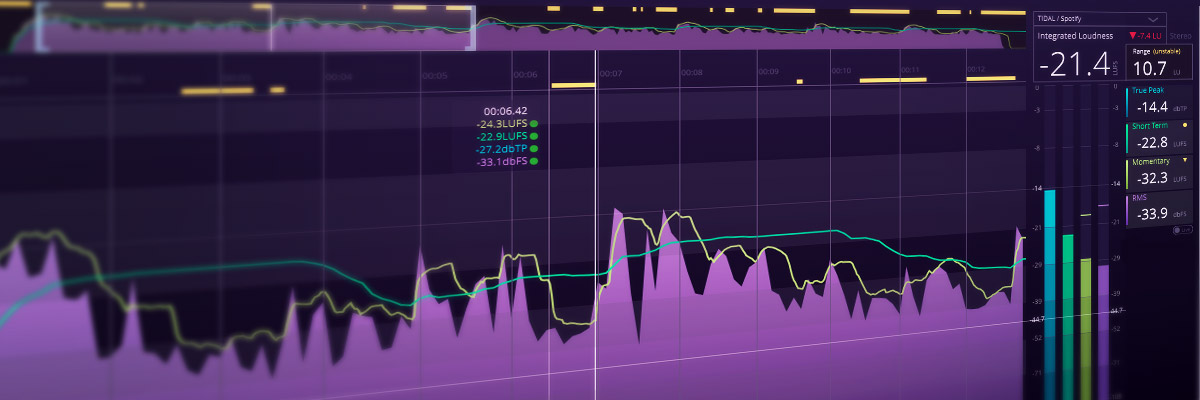
Review of the Bute Loudness Analyser and Normaliser
November 23, 2021
Company: Signum Audio
Product: Bute Loudness Analyser
Price: Stereo - £69 Surround - £89
Our Rating: 4.9/5
Every sound professional understands the role of audio in a project, but how it's mixed is crucial. The execution of loudness standards play an important role in the success of a project no matter who you are delivering it to. In order to maintain a dynamic mix that meets industry standards, Scotland-based Signum Audio have developed tools such as the Bute Loudness Analyser and Bute Loudness Normaliser to ensure compliance for streaming and broadcasting standards. The plugins are available separately or in a bundle called Bute Loudness Suite.
One obvious advantage to this plugin is it's excellent price point. For less than £100 it includes loudness standards for YouTube, TIDAL and others from across the globe, including your traditional EBUR128 / EBUR128s1.
The interface provides an overview of the loudness graph of your session. Best of all, it uses an automatic re-metering after adjusting small sections of your mix, down to the sample accurate level. You can even set alerts for particular audio events such as true peak levels, or thresholds of short term loudness.
While easy to navigate, the Bute Loudness Analyser might be intimidating for newcomers to loudness compliance, as it has quite a comprehensive feature set. However, the ability to use presets for different specifications is excellent, and the following plugin in the bundle helps account for the more novice user.
Check out the Loudness Analyser here
Company: Signum Audio
Product: Loudness Normaliser
Price: Stereo - £99 Surround - £149
Our Rating: 4.9/5
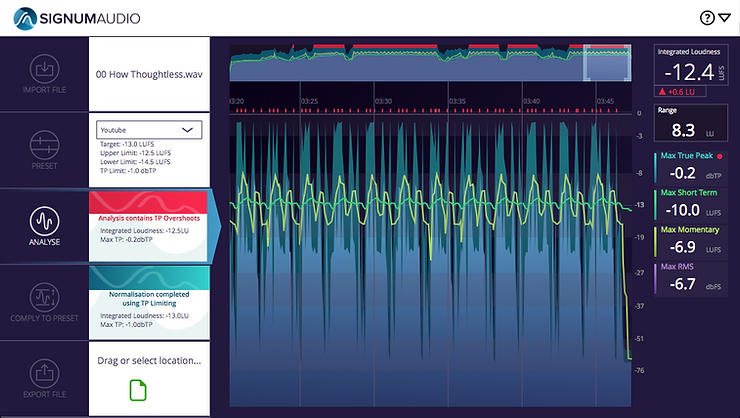
The Loudness Normaliser Includes a wide range of specifications, a very welcome addition being the Netflix compliance specification. It allows for automatic processing of your laybacks to adhere to the chosen standard. In addition, a simple to use, and very well designed interface will have you rendering compliant audio files in no time! The Normaliser comes as an Audiosuite plugin and a standalone software. Both plugins include metering in formats up to Dolby Atmos 7.1.2.
Loudness normalisation is never a substitute for meeting compliance at the mixing stage, but it is a great way to give you piece of mind, and to double check your mixes when delivering to a new spec.
You should always measure your mix with two loudness meters or audiosuite plugins as readings can vary. Pro Tools Ultimate comes bundled with Pro Limiter Loudness Analyser which can act as your second option.
Check out the Loudness Normaliser here
These two plugins provide a much more comprehensive loudness compliance solution than you will find in others at this price point. The ability to customise your workflow and interface is second to none and the price tag is the icing on the cake for today’s post production professionals. There is also a Bute Limiter coming in February as part of the Suite. This is a must buy for 2019.
Check out the Loudness Suite here

We are so happy to announce that after months of hard work, we can finally present phase two of the 344 Audio Studio Build!
November 23, 2021
We are so happy to announce that after months of hard work, we can finally present phase two of the 344 Audio Studio Build! There are now 3 areas in our studios:

Studio 1 will now be known as the 'Stephenson Suite' after prominent British inventor of the steam locomotive - George Stephenson.

Studio 2 (pictured below) will now be known as the 'Graham Bell Suite' after prolific British inventor of the telephone, also involved in the formation of the decibel - Alexander Graham Bell.

Finally, we have our newly completed ADR/VO/Foley Recording space (pictured below)!


We can't wait to reveal all of the other exciting things that are happening this year. Big thanks to everyone who has been supporting our mission!


